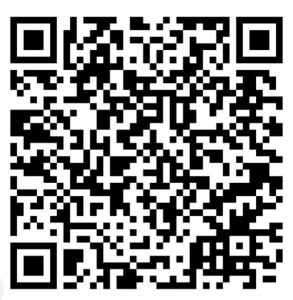
GARS Meshtastic Channel
Just acquired your first Meshtastic device? Welcome to a growing community of Meshtastic nodes in the greater Atlanta area!
When you first receive a new Meshtastic node it is typically setup in a default configuration with one channel and it is using the LongFast profile (frequency setting, spreading factor, bandwidth). As of October 1, 2025, the community from Atlanta north into east Tennessee has shifted to the MediumFast profile.
There is a quick method to configure your new device to use the MediumFast profile on channel 0 and add a channel 1 for legacy LongFast. Simply go to the Mountain Mesh site https://mtnme.sh/mediumfast/ and scan the QR code using your smartphone’s camera with a running Meshtastic app. Once you are in the MediumFast mode you’ll experience an explosion of nodes on the app’s map and node listing.
Now that you have joined the north Georgia mesh community, take the next step and add an additional channel for GARS. The GARS channel is a private channel using a 128-bit encryption key. Using the same process as done for the mtnme.sh procedure, scan the below QR code. When prompted, add (do not replace) the GARS channel.